Creating a home office that supports focus is essential for productivity and well-being. To achieve this, choosing a quiet space, minimising distractions, and organising the area effectively are key steps. A dedicated, tidy workspace with minimal interruptions is the foundation of maintaining concentration at home.
Lighting and ergonomics also play a vital role. Proper natural or artificial light prevents eye strain, while comfortable furniture supports posture and reduces fatigue. These elements together help sustain focus for longer periods.
Setting clear boundaries between work and personal life is equally important. Establishing routines and keeping work materials separate can help signal the brain to concentrate when in the home office.
Selecting the Optimal Home Office Space
Creating a productive workspace requires deliberate choices about location, boundaries, and layout. These elements help reduce interruptions and enhance concentration during remote work or WFH setups.
Establishing Boundaries for Focus
Clear boundaries distinguish the home office from living spaces, crucial for sustained focus. Ideally, the space should have a dedicated door or a visible partition to signal “work mode” and prevent household distractions.
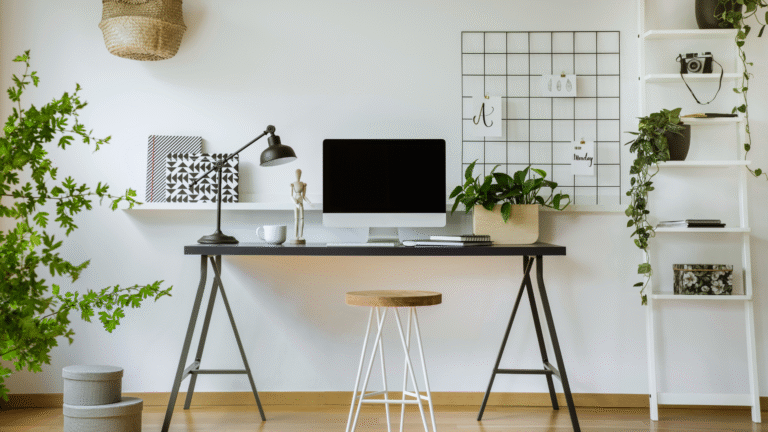
Physical separation aids mental separation. Consistency in using the same spot daily encourages routine. If a separate room is unavailable, a well-defined desk area with organisers, lighting, and minimal clutter can mark the work zone effectively.
Communicating these boundaries to others in the household reinforces respect for work time. Setting specific work hours and using signage can help maintain these limits.
Choosing a Location with Minimal Distractions
Selecting a quiet, low-traffic part of the home reduces auditory and visual disruptions. Rooms facing quieter streets, away from communal or entertainment areas, tend to support greater concentration.
Natural light is preferred, but it should be avoided on screens. Windows with adjustable blinds allow control over brightness and outside noise. Proper ventilation and comfortable temperature also influence focus and energy levels.
Proximity to essential home features like restrooms or the kitchen should be balanced to avoid frequent interruptions but maintain convenience.
Designating Work Zones in Shared Areas
When separate rooms aren’t an option, creating distinct work zones within shared spaces is vital. Use furniture like bookshelves or room dividers to visually and physically separate the workspace from relaxation areas.
Set up specific places for equipment, documents, and personal items to minimise clutter. Consistent use of these zones signals a professional environment for remote work.
Using noise-cancelling headphones and organising cords neatly can further reduce distractions. Clear boundaries within shared spaces support the mental shift between tasks and downtime.
Optimising Comfort and Ergonomics
Creating a workspace that supports focus requires careful attention to comfort and physical health. The right furniture and setup reduce strain and improve productivity throughout the day.
Investing in Ergonomic Furniture
Ergonomic furniture is designed to fit the user’s body and work habits, reducing discomfort and risk of injury. It prioritises adjustability to accommodate different postures and movements.
Choosing pieces made from durable materials with clean designs helps maintain a minimalist desk without clutter. Items such as adjustable desks and supportive office chairs ensure the home workspace adapts to diverse tasks and preferences.
Ergonomic furniture improves circulation and decreases muscle fatigue. This investment often leads to better concentration and less need for breaks caused by pain or stiffness.
Choosing the Right Office Chair
The office chair plays a central role in maintaining comfort and focus. Users should select an adjustable chair that supports natural spinal curves and allows fine-tuning of height, tilt, and armrests.
It must fit the chair height so that the feet rest flat on the floor or a footrest. Armrests should support elbows lightly without lifting the shoulders. Proper cushioning reduces pressure points over long periods.
High-quality materials like breathable mesh improve airflow. A chair that swivels and rolls smoothly increases mobility without disrupting posture.
Desk Setup and Adjustable Furniture
The desk should accommodate the monitor, keyboard, and essential tools in a way that prevents strain. A minimalist desk with enough surface area allows organised and clutter-free work.
Adjustable desks enable users to alternate between sitting and standing, reducing the health risks linked to prolonged sitting. The desk height must align the keyboard and mouse so arms are bent at roughly 90 degrees.
Screens positioned at eye level prevent neck and eye strain. A monitor stand or adjustable arm helps maintain ideal monitor height and distance, typically about an arm’s length away.
Lumbar Support and Posture
Lumbar support is essential for maintaining the natural inward curve of the lower back. Many ergonomic chairs include built-in lumbar cushions or adjustable supports to fill this area.
If the chair lacks lumbar support, a separate cushion can be added. Correct posture involves sitting back fully in the chair with hips slightly higher than knees and shoulders relaxed.
Regularly adjusting posture and using lumbar support helps prevent fatigue and back pain. This promotes longer periods of deep focus and reduces physical distractions in a home office setup.
Enhancing Lighting, Air Quality, and Ambience
A home office’s environment directly affects concentration and comfort. Proper lighting, fresh air, and subtle scents all contribute to creating a workspace that minimises distractions and supports productivity.
Maximising Natural Light
Maximising natural light helps reduce eye strain and boost mood. Position the desk near windows to take advantage of daylight, but avoid direct glare on screens by using sheer curtains or adjustable blinds.
Natural light varies throughout the day; arranging work hours around peak daylight can improve alertness. Reflective surfaces like white walls or light-coloured furniture also help distribute light evenly.
Careful window placement and unobstructed views outdoors encourage regular eye movement, decreasing fatigue. Keep windows clean to ensure maximum light penetration.
Utilising Desk Lamps and Task Lighting
Desk lamps provide targeted, adjustable lighting critical during low natural light periods. Choose lamps with adjustable arms and dimming features to prevent harsh shadows and regulate brightness.
Use LED bulbs with a colour temperature around 4000K to 5000K for a neutral white light that mimics daylight. Position lamps on the opposite side of the dominant hand to avoid casting shadows while writing or typing.
Avoid overhead lighting alone, which can cause eye strain. Combining ambient lighting with task lighting creates a balanced, comfortable workspace.
Improving Air Quality and Ventilation
Good air quality is essential to maintaining focus and reducing fatigue. Opening windows regularly encourages fresh air flow and reduces indoor pollutants.
Air purifiers with HEPA filters can capture dust, allergens, and VOCs released from office equipment. Indoor plants like spider plants and peace lilies also improve air quality by absorbing toxins and releasing oxygen.
Avoid clutter and dusty items that trap allergens. Proper ventilation prevents the buildup of carbon dioxide and stale air, which can cause drowsiness.
Incorporating Scents and Essential Oils
Using essential oils in a home office can promote alertness and calm. Oils such as peppermint and lemon enhance focus, while lavender or chamomile can reduce stress.
A diffuser allows steady, controlled scent release without overpowering the space. Avoid strong or synthetic fragrances that may cause headaches or distraction.
Always test scents in small amounts and ensure proper ventilation to prevent irritation. Scents should support concentration without overwhelming the environment.
Organisation, Personalisation, and Focus Tools
Creating a workspace that supports focus requires practical storage, thoughtful design, and tools that minimise distractions. Efficient organisation paired with personal touches helps maintain mental clarity and productivity.
Managing Clutter with Storage Solutions
He should use filing cabinets and shelves to keep documents and supplies organised and accessible. Vertical storage, like wall-mounted shelves, maximises space and prevents desk clutter.
Clear storage boxes and labelled folders assist with quick retrieval of items, reducing time spent searching. A clean, clutter-free surface encourages concentration and lowers stress.
Regularly sorting and discarding unnecessary items keeps the home office functional. Storage solutions should balance accessibility and tidiness to support daily workflow.
Effective Cable Management
Cable clutter disrupts focus and can create hazards. Using cable ties, clips, and under-desk trays keeps wires organised and out of sight.
He can label cables to identify devices easily. Wireless peripherals reduce the number of cables on or around the desk.
Planning cable routing during setup prevents tangling. Keeping cables neatly arranged boosts productivity by reducing distractions and workspace mess.
Incorporating Artwork and Personal Touches
Adding artwork or decorative items provides visual interest and enhances comfort without overwhelming the space. Choosing calming pieces can improve mood and concentration.
Personal items like photos or plants create a welcoming environment, promoting well-being. However, decorations should be minimal to avoid clutter that hinders focus.
Careful selection of colours and themes helps maintain a professional yet personalised space that supports sustained productivity.
Noise Reduction Strategies
Minimising noise improves concentration in home offices. Using noise-cancelling headphones is effective when unavoidable sounds are present.
He can also use rugs, curtains, and soft furnishings to absorb ambient noise. A door draft stopper or sealing gaps reduces noise leaks from other rooms.
Establishing quiet work hours with others in the household further limits disruptions. Strategically placed soundproofing supports a productive and focused environment.